You can mute any chat channel and don’t receive notifications about messages received in that channel. You can mute channels on each device seprately
Mute a chat channel on a desktop or a laptop computer
- Open the chat window for this user or Chat-Room
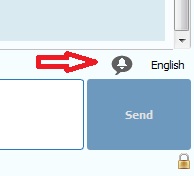
- Click on the bell icon in the chat window right above the send button
Mute a chat channel on a mobile device
- Open the chat for this user or Chat-Room
- Click on the three dots in the upper-right corner to see its profile
- Click on “View Contact Details”
- Click on “Notifications” and choose for how long to silence this chat
Keep reading
More articles on the same topic.